Assessment Schemas
Assessment schemas define the structured questions, scoring matrices, dependencies, calculated values, outcomes, and impactors used by runtime assessment reviews. In the transfer payment area, administrators reach a schema editor from stream review setup or assessment-set rows that reference an assessment review schema.
The schema record itself is agency-scoped. A schema used by a stream must belong to the stream's agency and match the configured runtime entity type.
Empty-System Prerequisites
Before a stream can use assessment schemas operationally, configure:
- Agency and transfer payment program.
- Stream.
- Common review schemas for the agency and entity type, with review type set to assessment.
- Stream review setup or assessment-set rows that reference those schemas.
- Approval templates if assessment completion or review steps require approval routing.
- Users and teams with read, save, complete, and approval permissions for the relevant runtime entities.
Where Schemas Are Opened
A schema is opened from a stream context, usually from Review Setups or an assessment-set management surface. The breadcrumb returns through the program and stream. The editor loads:
- Parent transfer payment profile.
- Parent stream.
- Assessment review schema.
- Effective schema content and scoring matrix.
- Helper fields available for the schema entity type.
The editor has a collapsible hero and a left sidebar with save controls and section navigation.
Lifecycle States
Assessment schemas use these states:
- Draft: editable pre-activation state. A draft can be activated.
- Active: current usable schema state. Active schemas can receive working-copy edits and can be published when there is a pending change.
- Inactive: retained but not the current editable/usable state.
The detail hero shows schema name, entity type, version, status, and whether pending publish content exists.
Activation
Activation is allowed only for a draft schema. Activating a draft:
- Sets the schema status to active.
- Sets version to
1. - Copies the effective scoring matrix and assessment definition into the published content fields.
- Clears the working-copy scoring matrix and assessment definition.
After activation, new runtime assessment work can use the published version of the schema.
Publishing
Publishing is allowed only for an active schema with a working copy that differs from the published copy. Publishing:
- Computes whether the change is major, minor, or none.
- Updates the published scoring matrix and published assessment definition.
- Clears the working copy.
- Updates the version when content changed.
Version behavior:
- Structural changes are major. Adding, removing, or renaming sections, subsections, questions, outcomes, or impactor targets changes the structural signature.
- Non-structural content changes are minor. Examples include label, description, score, threshold, help text, weight, and option changes when the structural names/counts remain the same.
- A no-op publish keeps the same version, but users normally cannot publish when there is nothing to publish.
Runtime implication: runtime assessments should use the published content. Editing an active schema creates or updates working-copy content until the administrator publishes it.
Save Behavior
The schema editor has one save action that validates and saves both general metadata and definition content:
| Area | Saved content |
|---|---|
| General | Schema names, outcome names, and disable flags. |
| Definition | Overall scoring matrix and assessment definition. |
If either area fails validation, the save is stopped and the first validation error is shown. If both are valid, the editor saves the schema and refreshes the page.
General Section
The General section captures:
- English and French schema name.
- English and French outcome name.
- Disable custom outcomes.
- Disable alignment.
- Disable reviewers.
The disable flags affect runtime assessment behavior:
- Disable custom outcomes limits reviewer ability to create outcomes outside configured schema outcomes.
- Disable alignment removes reviewer alignment behavior where supported.
- Disable reviewers removes additional reviewer behavior where supported.
Scoring Matrices
The Matrices section contains:
- Overall scoring matrix.
- Section scoring matrix.
Each matrix row has:
- Maximum score threshold.
- English and French label.
- Indicator color, validated as a hex color.
Matrices translate numeric assessment or section scores into labels and visual indicators. Keep thresholds ordered and non-overlapping in practice, even though the data model stores max thresholds rather than a rendered range.
Sections
Sections are top-level groups in the assessment. Each section has:
- Order/number.
- Language-independent code.
- English and French label.
- Icon.
- Weight.
- One or more subsections.
The language-independent code is important because dependencies and calculations refer to section, subsection, and question codes. Renaming codes on an active schema is a structural change and can break references if dependent items are not updated.
Subsections
Subsections group questions within a section. Each subsection has:
- Order/number.
- Language-independent code.
- English and French label.
- Weight.
- Optional dependencies.
- Assessment questions and calculated items.
Subsection dependencies control whether the subsection appears or participates based on helper values or previous answers. Subsection weights can be fixed, adjustable, or an adjustable scenario array.
Assessment Items
Assessment items can be direct questions or calculated items.
A question contains:
- Language-independent code.
- English and French question text.
- Weight.
- Optional dependencies.
- Comment threshold with min and max.
- Optional assistance type. The current supported assistance value is funding history.
- Answer options.
- Help text.
Each answer option has:
- Numeric value.
- English and French label.
- English and French description.
Help rows have:
- English and French title.
- English and French description.
Calculated Items
A calculated item stores:
- Language-independent code.
- English and French label.
- Weight.
- Optional dependencies.
- Help text.
- Formula.
Formula roots must be operations. Supported calculation operators include add, subtract, multiply, divide, sum, average, min, max, round, clamp, coalesce, if, eq, ne, gt, gte, lt, lte, and, or, and not.
Formula operands can be:
- Number literal.
- Boolean literal.
- Answer reference, using section code, subsection code, and question code.
- Helper reference.
- Nested operation.
Validation rejects formulas that reference missing assessment items, formulas that reference invalid helper fields, and calculation cycles between calculated items.
Weights
Weights can be:
- Fixed: one numeric weight.
- Adjustable: a dependency target plus score-key-to-weight mappings.
- Adjustable scenario array: base weight plus multiple dependency scenarios, each with score-key-to-weight mappings.
Dependency targets can be helper fields or answer paths. Helper targets are validated against the helper registry for the schema entity type. Answer targets use section, subsection, and question codes.
For adjustable weights, if no mapping matches at runtime, the calculation logic falls back to the first available item, which can effectively produce a zero contribution depending on the configured values. Administrators should define explicit mappings for every expected answer or helper value.
Dependencies
Dependencies control conditional visibility or applicability. A dependency rule can be a single condition or a grouped set of conditions. Each condition has:
- Dependency type: helper or answer.
- Target helper field or answer path.
- Value type: boolean, number, or text.
- Expected value.
Helper dependency values are type-checked against the helper definition. For applicant recipient assessments, available helper fields include identifiers, business numbers, subtype, lead agency, lead officer, legal names, research organization names, NAICS, and status.
Dependencies on answers use the language-independent section, subsection, and question codes. Rename these codes carefully.
Outcomes And Strategies
Assessment outcomes are configured in the Outcomes section. Each outcome contains:
- Language-independent code.
- English and French label.
- One or more strategies.
Each strategy contains:
- Language-independent code.
- English and French label.
- Options.
Each strategy option contains:
- Maximum score threshold.
- Stored value.
- English and French label.
Outcomes and strategies translate calculated assessment results into business outcomes. Custom runtime outcomes may be disabled by the general setting.
Impactors
Impactors adjust or classify assessment results based on helper or answer values. Each impactor has:
- Weight.
- Optional English and French label.
- Dependency target.
- Scoring matrix rows.
Each impactor scoring row has a max threshold and numeric value. Impactor targets are part of the structural signature used to decide whether a publish is major or minor.
Runtime Assessment Flow
When runtime review work is generated from stream setup, the assessment runtime page presents the published schema content. Reviewers answer questions, calculated items derive values from answers or helpers, dependencies determine which portions apply, and matrices/outcomes summarize the results.
Runtime assessment pages can include:
- Schema questions and answer options.
- Scoring summaries.
- Outcome selection or calculated outcome display.
- Reviewer comments.
- Additional reviewer handling unless disabled by the schema.
- Alignment handling unless disabled by the schema.
- Approval routing when the generated review references an approval template.
- Completion action.
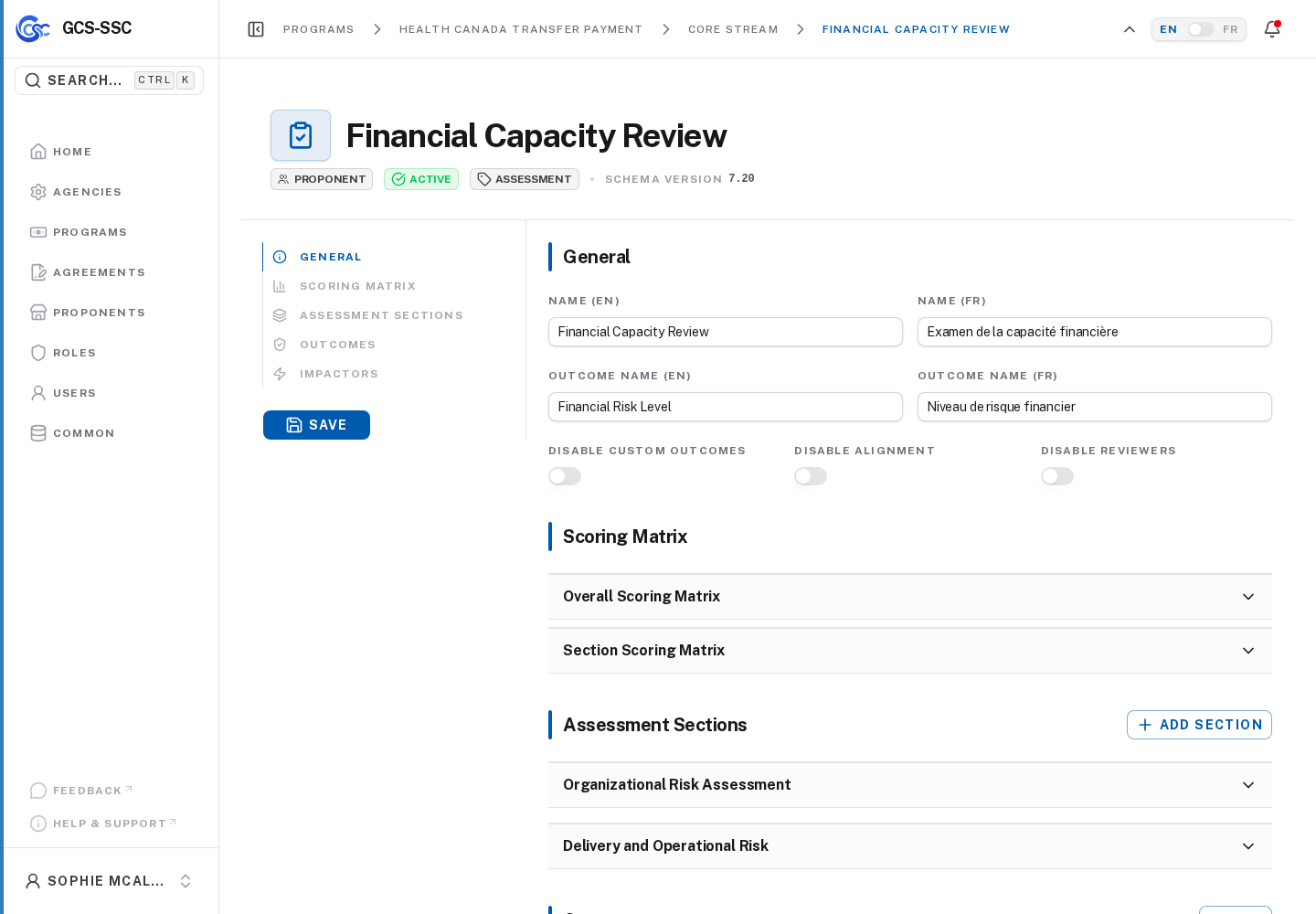
Actual screenshot from the seeded development environment. The records shown are examples only and are not created in a fresh installation.
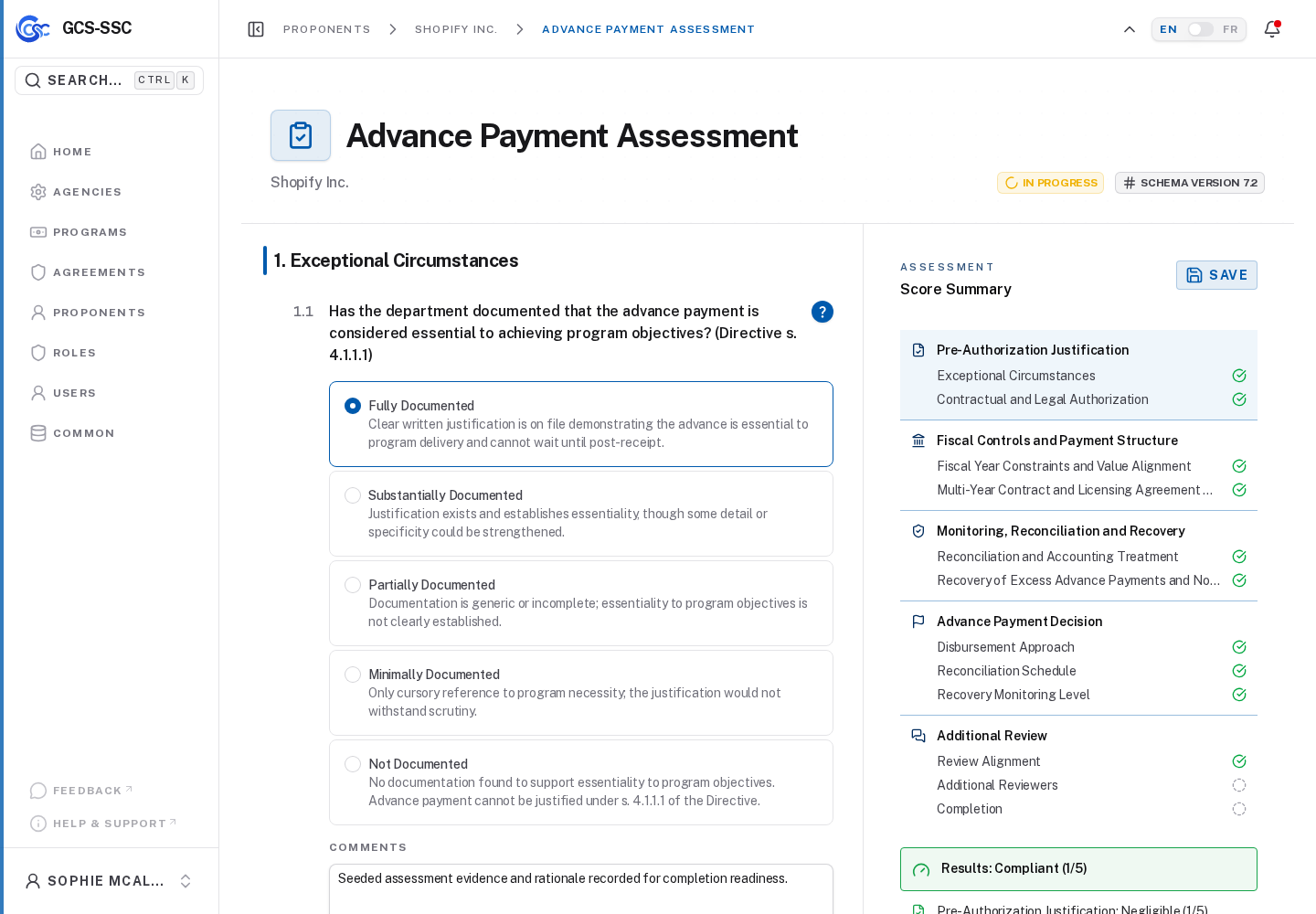
Actual screenshot from the seeded development environment. The records shown are examples only and are not created in a fresh installation.
Completion Behavior
Runtime completion is handled by the common completion section. It loads completion state for an entity type and entity ID, then shows either:
- Completed metadata: completed by, completed at, and comment.
- A comment box and completion action when the user can complete and the entity is not locked.
- A locked message when completion is blocked by page state.
Submitting completion saves comments and, for common review completion, can include the assessment response. The user must have permission to save the assessment before completion is recorded.
Approval Behavior
When an assessment or review has an approval template, the common approvals section can materialize and manage routing slips. Approvals are grouped by routing slip and step.
Approvers can:
- View current and previous routing slips.
- Create a new routing slip only when allowed and all existing routing slips are denied.
- Reassign a current step when they have manage approval permission.
- Approve or deny a current actionable step.
- Complete required certifications during approval.
- Provide a required comment when denying.
- Act on behalf of another user when the assigned approver differs from the default or when an on-behalf type is selected.
If an on-behalf type requires actual approval details, the approver must enter an actual position title and decision date.
Operational Guidance
Use these practices for stable schemas:
- Treat language-independent codes as durable identifiers.
- Publish active schema changes before expecting new runtime work to use them.
- Avoid deleting or renaming codes that existing runtime responses may reference.
- Keep option values, matrix thresholds, risk ratings, and outcome thresholds aligned.
- Configure helper dependencies only for helper fields available to the schema entity type.
- Test calculated items after adding dependencies, because missing references and cycles are validation errors.
- Configure approval templates and default users before attaching templates to review setup members.