Approval Templates
Approval templates define ordered approval routes. A template stores the runtime entity type, bilingual template metadata, ordered approval steps, default approvers, approver titles, and step certifications. At runtime, templates are materialized into routing slips that users can approve, deny, or reassign.
In transfer payment setup, templates are commonly configured at the stream level and then referenced by review setups, recommendation setups, assessment members, or runtime workflows for agreements, claims, forecasts, payments, monitoring, applicant recipients, and related work.
Empty-System Prerequisites
Before creating operational approval templates, configure:
- Common users who can be selected as default approvers.
- Agency approval behalf types if users can approve on behalf of others.
- Stream, review setup, recommendation setup, or other runtime setup that will reference the template.
- Permissions for users who will manage templates and users who will act on runtime approvals.
Templates can be saved without steps, but a template with no steps produces an empty routing slip and cannot collect meaningful approvals.
Where Templates Live
Approval templates can be managed through common setup surfaces and through the stream Approval Templates tab. Stream templates use:
- Scope type
transferpaymentstream. - Scope ID equal to the stream ID.
- Entity type selected from the supported approval-template entity types.
The stream tab groups templates by entity type. Each row shows the bilingual template name, step count, and certification count.
Supported Entity Types
Transfer payment stream approval templates support these entity types:
- Applicant recipient.
- Funding case agreement.
- Common review.
- Common recommendation.
- Funding case intake.
- Funding claim reconcile.
- Funding case forecast.
- Funding case payment.
The common approval template schema also recognizes funding case monitor as a valid approval-template entity type. Use only the entity types exposed by the stream surface when configuring stream-scoped templates.
Template List
The template list supports:
- Search and pagination.
- Grouping by entity type.
- Add, edit, open, and delete actions according to child update/delete permissions.
- Step and certification count badges.
The add/edit modal captures the template header fields only:
- Entity type.
- English and French name.
- English and French description.
Steps and certifications are managed from the template detail page.
Template Detail Page
Opening a template displays a detail workspace with:
- Breadcrumb back to the program and stream context.
- Collapsible hero with template name, description, entity type, step count, and certification count.
- Sidebar with General and Approval Steps sections.
- Save action for the full template.
The General section contains:
- Entity type. This is displayed in a disabled enum control on detail because changing the runtime entity type after creation would change how the template is used.
- English and French name.
- English and French description.
Approval Steps
Approval steps are the ordered actions in a routing slip. Each step contains:
- Order / sequence.
- Approver title.
- English and French name.
- English and French description.
- Default user.
- Zero or more certifications.
Step order must be unique within the template. The template detail page saves steps in sequence order.
The default user is selected from the common users lookup. Runtime routing slips use the default user as the assigned approver unless the step is reassigned.
Step Editor
The step editor opens fullscreen for add or edit. It contains the step fields and a certifications accordion. Saving the editor updates the local template state; the template is not persisted until the main template save action succeeds.
Use this distinction carefully: closing a step editor does not save the template. The template detail page must still be saved.
Certifications
Certifications are checklist statements that an approver must handle when approving or denying a step. Each certification contains:
- Order.
- Optional flag.
- English and French name.
- English and French description.
- English and French certification text.
Certification order must be unique within a step. Certification bilingual names must also be unique within a step.
Runtime behavior:
| Rule | Behaviour |
|---|---|
| Required certifications must be checked | Approval is disabled until they are checked. |
| Optional certifications can remain unchecked | They do not block approval. |
| Certification text follows user language | Text is shown in the approver's language when possible. |
Validation Rules
Template validation enforces:
| Rule | Behaviour |
|---|---|
| Entity type is required | The type must be one of the supported runtime entity types. |
| Template text is bilingual | English and French template name and description are required. |
| Step fields are complete | Each step requires sequence, bilingual name, bilingual description, default user, and approver title. |
| Step sequence is unique | Non-deleted steps cannot share the same sequence. |
| Certification fields are complete | Each certification requires order, bilingual name, bilingual description, optional flag if used, and bilingual certification text. |
| Certification order is unique | Non-deleted certifications in the same step cannot share order. |
| Certification names are unique | Non-deleted certifications in the same step cannot share the same bilingual name. |
Removed steps or certifications are applied when the full template is saved. Until then, the editor is only holding the current draft state.
Referencing Templates From Stream Setup
Templates become operational only when referenced by another setup record or runtime process. Common stream references include:
- Review setup: an optional approval template can be attached to the whole review set.
- Review setup member: an optional approval template can be attached to a specific assessment/review schema member.
- Recommendation setup: an optional approval template can be attached to generated recommendations.
- Runtime entity workflows that select approval templates by stream, entity type, or setup relation.
When a setup references a template, changing the template affects future materialized routing slips. Already materialized runtime approvals are represented by routing slips and approval rows, not by a live pointer that rewrites completed approval history.
Runtime Routing Slips
At runtime, the common approvals section loads approval state for an entity type and entity ID. It can return:
- No approval mode.
- Pending materialization.
- Runtime mode with routing slips and steps.
Routing slips are grouped in the approval table. Each routing slip has:
- Bilingual name.
- Status.
- Current flag.
- Preview flag.
- Steps.
Each step shows:
- Bilingual step name.
- Default approver.
- Assigned approver.
- Approval status.
- Decision date and decision actor when completed.
- Comment.
- Certifications.
- Whether the step is current.
- Whether the current user can action or reassign it.
Creating Additional Routing Slips
The runtime approval section allows adding a routing slip only when:
- Approval runtime mode is active.
- The user can manage review approvals for the runtime entity.
- At least one routing slip already exists.
- Every existing routing slip is denied.
This supports re-routing after denial without overwriting the denied routing slip history.
Approve And Deny Actions
The approval action modal is opened from the current actionable step. It shows:
- Required and optional certifications.
- Default approver.
- Assigned approver.
- Optional on-behalf toggle when assigned approver differs from default.
- On-behalf type selector when acting on behalf.
- Position title.
- Decision date when the selected on-behalf type requires actual approval details.
- Comment.
Approval is disabled when:
- A required certification is unchecked.
- Acting on behalf without selecting an on-behalf type.
- Actual approval details are required but title or decision date is missing.
Denial is disabled when:
- Comment is blank.
- Acting on behalf without selecting an on-behalf type.
- Actual approval details are required but title or decision date is missing.
The approval action records the decision, certifications, on-behalf data, actual decision details when supplied, and comment. Approve and deny both require action-review-approval permission.
Reassignment
The reassignment modal allows a manager to change the assigned user for a step. It contains:
- Assigned approver lookup.
- On-behalf type when the assigned user differs from the default user.
If the assigned user is set back to the default user, the on-behalf value is cleared. Reassignment requires manage-review-approval permission.
Completion And Approval Relationship
Approval templates and completions are separate but often appear together in runtime review pages:
- Approval records capture ordered decisions and certifications.
- Completion records capture final completion value, user, timestamp, and comments.
- A page can lock completion until required assessment or approval conditions are met.
Administrators should configure both the template route and the runtime setup that decides when the route is required.
Operational Guidance
Use these practices:
- Create templates per entity type and stream when approval routes differ by program stream.
- Keep step sequence numbers simple and unique.
- Use default users who are active common users and have appropriate operational responsibility.
- Write certification text as the exact statement the approver must acknowledge.
- Mark a certification optional only when it is informational or conditional.
- Attach templates to review/recommendation setup only after steps and certifications are complete.
- Test one runtime routing slip before production use, especially when on-behalf approval is expected.
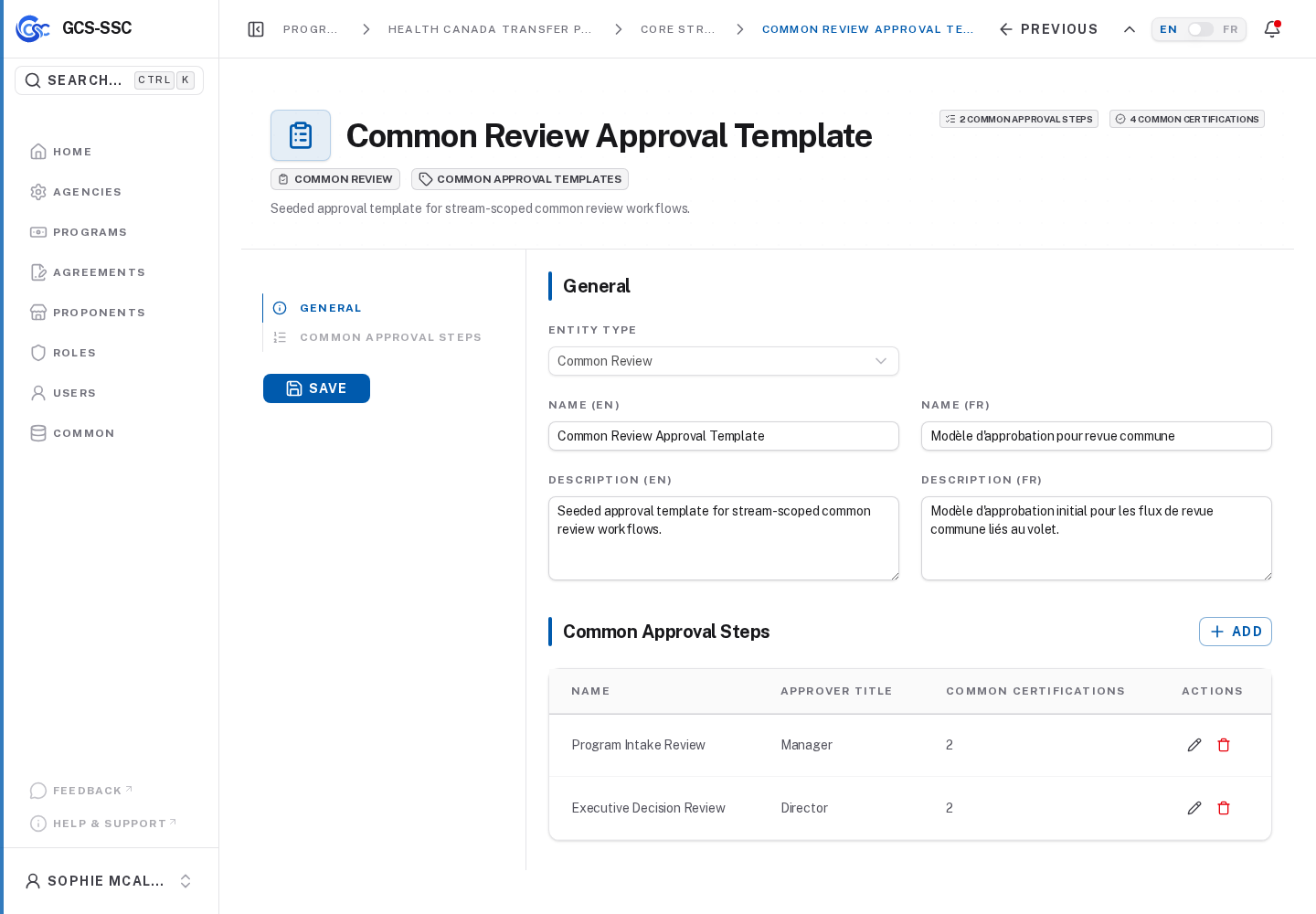
Actual screenshot from the seeded development environment. The records shown are examples only and are not created in a fresh installation.